 Sticky Clipboard for Mac
Support
How can we help?
The essentials are below. If you can't find an answer, write to [email protected].
Getting started
- Copy as usual. Sticky Clipboard lives in the menu bar and saves what you copy in any app.
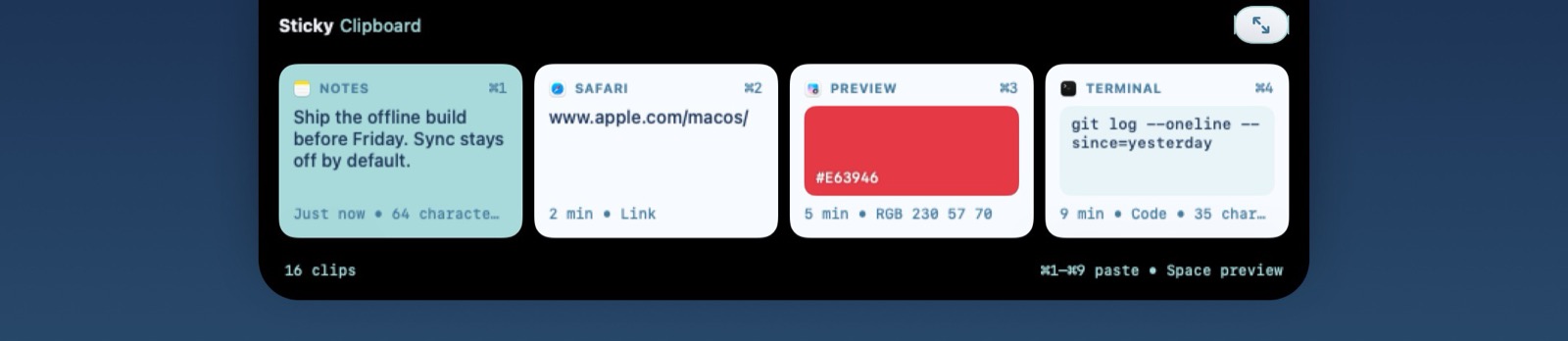
- Open the panel. Press ⇧⌘V. Your recent clips appear at the top of the screen. Press it again to expand the panel for search, pinboards and tools, and once more to close it.
- Paste. Pick a clip with the arrow keys and press Return, double-click it, or press ⌘1 to ⌘9. It is pasted into the app you were using.
The first time, Sticky Clipboard walks you through choosing your shortcut, how long to keep history, and allowing Accessibility access so it can paste for you.
Keyboard shortcuts
While the panel is open:
| Return or double-click | Paste the selected clips |
| ⇧Return | Paste as plain text |
| ⌘1 … ⌘9 | Paste that clip (add ⇧ for plain text) |
| ← → (and ↑ ↓ when expanded) | Move the selection; hold ⇧ to select several |
| ⌘← ⌘→ | Previous or next list (History and your pinboards) |
| Start typing, or ⌘F | Search; press ⌘F again to list all filters |
| Space | Quick Look preview |
| ⌘C | Copy without pasting |
| ⌘O | Open a link or file |
| ⌘R · ⌘E · ⌘N | Rename · edit · new text clip |
| Delete · ⌘Z | Delete · undo delete |
| ⇧⌘N | New pinboard |
| ⌘T | Pause or resume capture |
| ⌘, | Settings |
| Esc | Clear the search, then close the panel |
The open shortcut, the list shortcuts and the paste modifiers can be changed in Settings ▸ Shortcuts.
Common questions
What can Sticky Clipboard save?
Text, formatted text, links, images, files, colors (hex codes such as #E63946) and code. Each is shown with a fitting preview, along with the app it came from and when.
Why does it ask for Accessibility access?
Only to paste for you: after you pick a clip, it sends ⌘V to the app you were using. Without the permission, picking a clip copies it to the clipboard and you press ⌘V yourself. You can allow it later from Settings ▸ Privacy ▸ Accessibility Access.
How long is my history kept?
One month by default. Choose one day, one week, one month, one year or forever in Settings ▸ General ▸ Keep For. Pinned clips are kept regardless.
How do pinboards work?
Create one with ⇧⌘N or New Pinboard in the sidebar, then pin clips from their context menu, the Pin button, or by dragging them onto the pinboard. A clip can be on one pinboard at a time and stays in your history too. Right-click a pinboard to rename it, change its color or delete it.
Can I paste several clips at once?
Yes. Select them with ⇧ and the arrow keys, or ⌘-click, then press Return. Text clips are pasted one per line, in order.
Are my passwords saved?
No. Password managers mark what they copy as confidential, and Sticky Clipboard skips those items by default. You can also add any app to Settings ▸ Privacy ▸ Ignore Applications, or pause capture with ⌘T or from the menu bar.
Does it sync with my other devices?
No. Sticky Clipboard works on a single Mac and never connects to the internet. See the privacy policy.
Can I hide the menu bar icon?
Yes, in Settings ▸ General. You can still open the panel with your shortcut, and reach Settings from the panel with ⌘,.
Will the panel show up when I share my screen?
Not by default: it is hidden from screen sharing and recordings. Turn on Settings ▸ Privacy ▸ Show During Screen Sharing if you want it visible.
What do I need to run it?
A Mac with macOS 14 Sonoma or later.
Troubleshooting
Clips are copied but not pasted
Check System Settings ▸ Privacy & Security ▸ Accessibility and make sure Sticky Clipboard is turned on. After an update macOS sometimes needs the permission again: turn it off and on, or remove the app from the list with − and allow it again. Also check that Settings ▸ General ▸ Paste Into Active App is on.
Something I copied is missing
Capture may be paused (the menu bar icon shows a pause symbol), the app you copied from may be on your Ignore Applications list, or the app may have marked the item as confidential or temporary. If you are searching or have a filter on, clear it with Esc.
The shortcut doesn't open the panel
Another app may be using the same shortcut. Choose a different one in Settings ▸ Shortcuts, or open the panel from the menu bar icon.
A file clip won't paste
If the original file was moved, renamed or deleted, or is on a drive that is not connected, it can't be pasted. Copy it again from its new location.
Contact
Email support
Write to [email protected]. It helps to include your version number (Settings ▸ About) and your macOS version. Please don't include clipboard contents you'd rather keep private.
For refunds and billing, contact Apple: purchases are handled by the App Store.